Cursor Agent Keeps Stopping — How I Fixed It with Hooks and Slack
I’ve been using Cursor more and more lately. Started using it while building Lassare itself, specifically for the hooks configuration and code review and it just gets stuck, every now and then.
If you use Cursor’s agent for long tasks you’ve surely experienced the same: you kick off something, step away, and come back to find it stopped mid-way. Waiting. Either it hit a decision point, needed your input, needs to use a tool it is not allowed to, or just finished and had no idea what to do next.
Same problem I had with Claude Code. Same fix.
Hooks.
What are hooks in Cursor? Cursor has a hooks system — scripts that run automatically at specific points in the agent loop. You can intercept before a tool runs, after a file is edited, before the agent stops, and more.
The hook I needed was beforeShellExecution, it fires before the agent executes anything that might need my attention. The hook triggers the request to Slack via MCP. I answer from my phone, the agent continues.
The other one was the stop hook — same idea as Claude Code. When Cursor is about to stop, instead of just sitting there it asks you what’s next. You reply from Slack, it keeps going.
Once both hooks were in place the loop closed. Cursor working locally, me anywhere, decisions happening via Slack.
The screenshot below is from my phone. “Cursor is stopping. Anything else?” — I replied “Done” and that was it.
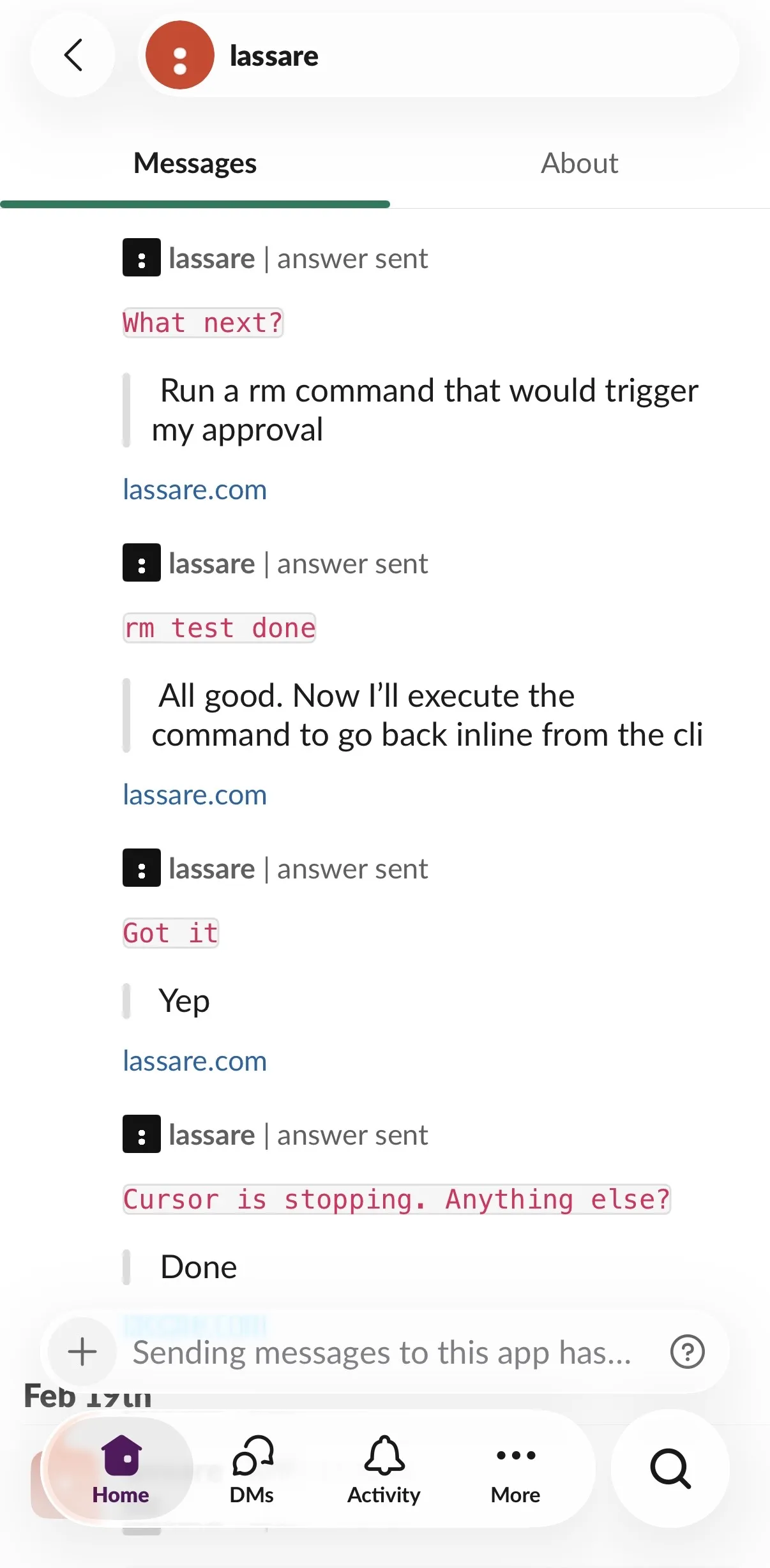
The hooks config for Cursor is in our public repo if you want to have a look: lassare-hq/agent-configs
You don’t need to go full yolo and let the agent do whatever it wants just to avoid babysitting it. You can keep control, without being stuck at your desk.
Anthropic just released Channels for Claude Code, same idea, your agent reaches you on Telegram or Discord. Great if you’re on Claude Code. For Cursor users, hooks plus Lassare MCP gets you there today, via Slack.
Same MCP server works with Claude Code, Gemini CLI and GitHub Copilot too. One setup, all your agents.
Give it a try at lassare.com.